SchnellMCP: Ruby native MCP server experience
By

Do you have, like me, a bunch of Ruby scripts that make your life easier? Why not make them available to your e-friends too?
The Trigger
A few weeks ago, I was exploring Temporal (looks promising, worth checking out) and stumbled into a tutorial about building an MCP server. It used Python with the FastMCP library. I’d been curious about MCP for a while but kept putting it off, thinking it’d be complicated.
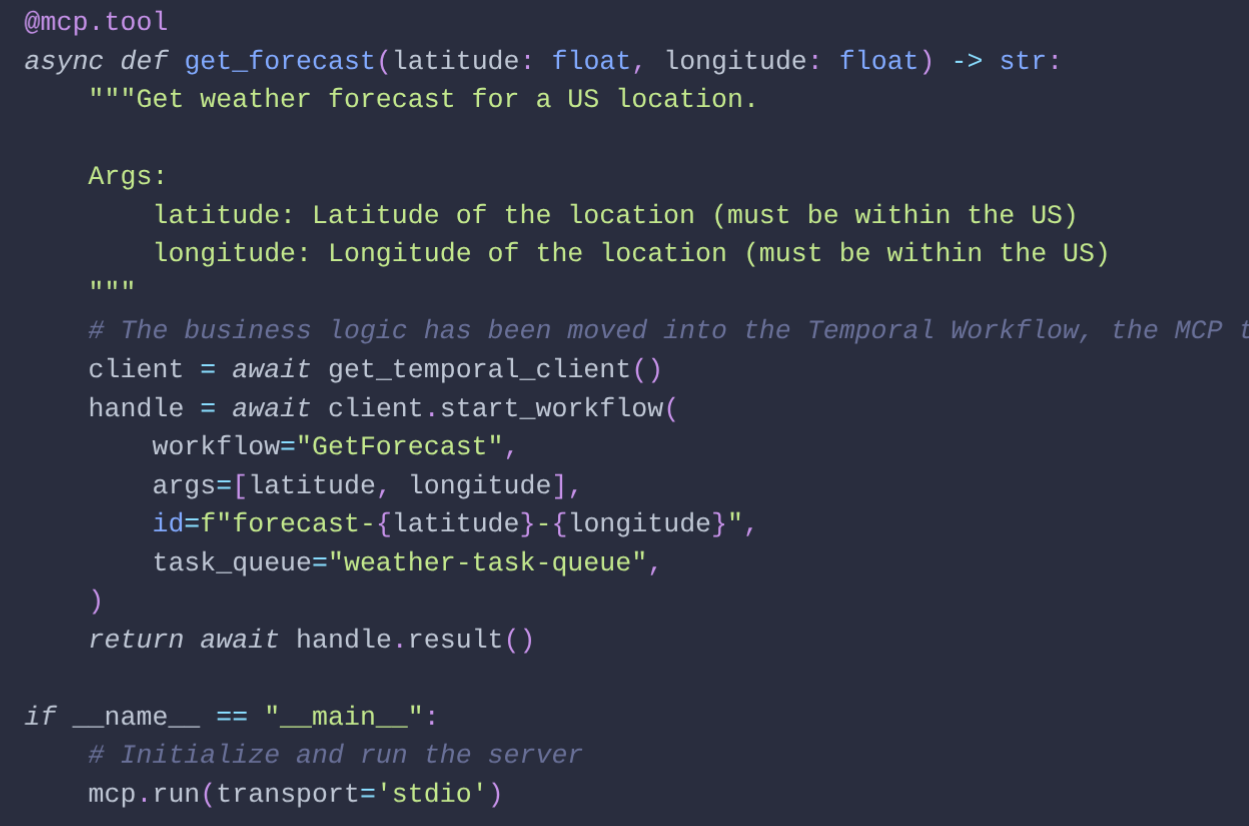
Then I saw the example. It was suspiciously simple: a plain Python method, a docstring, type annotations, and a single decorator. That’s it. One decorator, and suddenly your e-friend can call it. That simplicity caught me. Could Ruby feel this natural?
What’s Already Out There
I started looking. What did Ruby already have for MCP?
-
ruby-sdk — maintained by
Koichi ITO (@koic)
- Official, low-level protocol implementation
- Great foundation for building on top
-
mcp-rb — created by
Kazuyuki Hashimoto (@funwarioisii)
- Full-featured, supports resources and templates
- Rake/Thor-like experience with tool definitions separate from code
-
fast-mcp — created by
Yorick Jacquin (@yjacquin)
- Chained DSL doesn’t quite have that Ruby feel
All solid projects doing great work. But I wanted something different: take code I’ve already written, add annotations, and it becomes an MCP server. No DSL to learn. No separate tool definitions. Why write special instructions just for your e-friend when the code and its docs already say everything that needs saying?
The Idea
Then it clicked. Ruby’s had method documentation for decades — RDoc and YARD. I already write @param types and @return descriptions. That metadata is already there.
What if one tag — just @mcp.tool — could turn a documented method into something your e-friend can call? No new syntax. No separation between “tool definition” and “actual code.” Just annotated Ruby.
Bonus: LLMs love generating YARD comments. I usually delete them. Finally, a reason to keep them — turns out e-friends benefit from the same docs you do.
Building It
The result is what I currently call SchnellMCP. Plain Ruby methods + YARD docs = (also) MCP tools. Here’s a simple example:
require 'bundler/inline'

gemfile do
  source 'https://gem.coop'
  gem 'schnellmcp', git: 'https://github.com/RubyElders/schnellmcp'
end

require 'schnellmcp'

# Add two numbers
#
# @param a [Integer] First number
# @param b [Integer] Second number
#
# @return [Integer] Sum of a and b
#
# @mcp.tool
def add(a, b)
  a + b
end

# Start the MCP server if called directly
SchnellMCP::Server.run(__FILE__) if __FILE__ == $0
Standard YARD documentation. One @mcp.tool tag. Done. The MCP tool description and parameter types come straight from the docs. Type casting is automatic.
Code that feels like Ruby, not “MCP framework code.” That’s what I was after.
Daily Use
I’ve been working on a C++ project — not my strongest language, so LLMs help a lot. The usual flow: write code, compile, test, repeat. But C++ build state is a minefield. What’s the current state of the build? Is my latest change actually included? Did cache invalidation properly detect my file changed during compilation? Is the build folder properly bootstrapped and up to date with the latest CMake configuration? These questions sound silly until you’ve wasted an hour debugging code that wasn’t even running.
Classic example: add a log line to debug something, run the code, line doesn’t appear. Now what? Was the file rebuilt at all? Do I need to rebuild and try again? Clear the cache and start fresh just to be sure? Without knowing the history and current state, it’s genuinely hard to tell. Sound familiar?
I wrapped the whole thing into a Ruby script — one command that ensures every run starts from a predictable state. Build folder, cache, compilation — handled, every time. No more build archaeology before getting to the actual problem. Sometimes I trigger it myself, sometimes it’s part of a larger script. No more guessing, no more side-quests.
And then with one @mcp.tool annotation, the same script became available to my e-friend too. Same tool, same predictable state — now my e-friend doesn’t get sidetracked on build archaeology either, and can focus on what actually matters.
One plain Ruby file covers all three use cases naturally: CLI for quick manual runs, MCP server for the e-friends, and a regular require when another script needs it. No extra framework, no duplication, just Ruby. Here’s a partial example — just the preset listing task — to show the idea:
require 'bundler/inline'

gemfile do
  source 'https://gem.coop'
  gem 'schnellmcp', git: 'https://github.com/RubyElders/schnellmcp'
end

require 'schnellmcp'
require 'json'

# List available CMake presets
#
# @param path [String] Path to directory containing CMakePresets.json
#
# @return [Array<String>] List of available preset names
#
# @mcp.tool
def list_cmake_presets(path = ".")
  presets_file = File.join(path, "CMakePresets.json")
  data = JSON.parse(File.read(presets_file))
  data["configurePresets"].map { |preset| preset["name"] }
end

# Run based on how the script was invoked
if __FILE__ == $0
  if ARGV[0] == "server"
    # MCP server mode for e-friends
    SchnellMCP::Server.run(__FILE__)
  else
    # CLI mode for humans
    puts list_cmake_presets(".")
  end
end
One file, three modes:
-
ruby cmake.rb server— MCP server for my e-friend -
ruby cmake.rb— CLI for quick checks -
require_relative 'cmake'— library for other scripts
Same code, three ways to use it. Plain Ruby throughout — testable, composable, nothing special.
The CMake example captures the whole idea: I wrote the script because I needed clarity. My e-friend needed that same clarity. One tool, useful for everyone — including my e-friend.
What’s Next?
SchnellMCP is a prototype — single files only, no dependency parsing. Just enough to work with GitHub Copilot, which is what I use. And I’ve been running it daily for months, steadily adding more tools as I find scripts worth exposing.
It would probably deserve a proper backend at some point — like the aforementioned ruby-sdk for solid protocol handling — but even with the current minimal and hacky code it still fully works, and honestly I haven’t found a reason to rush that yet.
Check it out at github.com/RubyElders/schnellmcp — and if you have a drawer full of little Ruby scripts, you’re probably closer to an MCP server than you think.
Have your own stories of Ruby tools and e-friend integration? Come say hi on Mastodon, Bluesky or Twitter/X — and above all, good luck educating your e-friends with your own dev habits. 🤖